


Land2Map

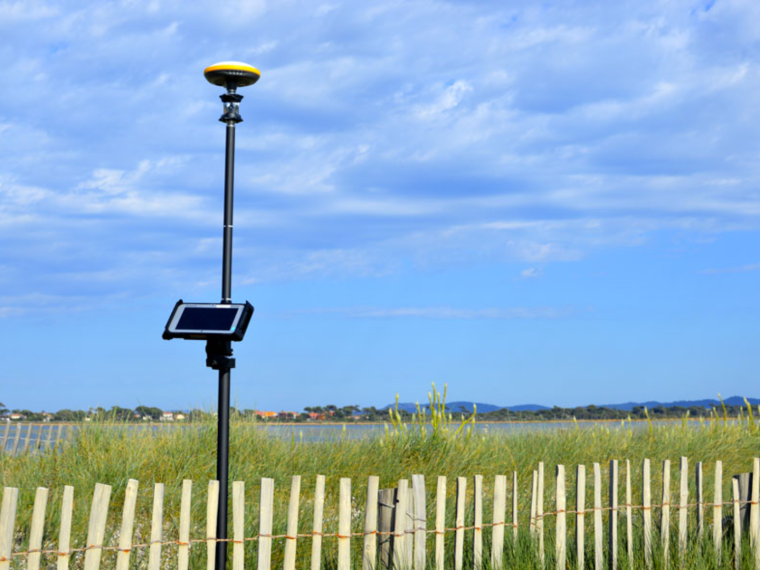
Touchscreen tablet surveying software that works natively in DWG format

Still weighing your options? Let’s talk
Talk to an expert to learn more about our solutions
Contact an expertRethink topographic production, from field to deliverable
Land2Map turns the field into a true production environment. Measurement, checking, drawing, setting-out and as-built recording follow one another in a single mobile DWG environment, connected to surveying instruments, to produce, verify and adjust data as close as possible to the action.
By bringing tools, data and decision-making capability closer to the site, Land2Map strengthens the autonomy of surveyors and technicians, secures data quality earlier and reduces the back-and-forth between field and office.
Data remains usable throughout the workflow, from survey to deliverable, in an environment compatible with the main surveying equipment on the market.
Fewer rework loops, decisions made earlier and a continuous topographic production chain, with no break between field and office.
Land2Map is compatible with the main manufacturers on the market: Leica Geosystems, Trimble, Spectra, Sokkia.
Move your as-built records to RecoStar, without disrupting your workflow
Land2Map integrates the new RecoStar standard, the version of the national StaR-Elec geostandard promoted by Enedis, which is due to gradually replace the PGOC format for all electricity network as-built records.
- Benefit from a pre-configured RecoStar working theme, with a wide choice of business objects and attributes compliant with the new standard
- Produce deliverables that directly meet RecoStar requirements (GML export, PDF plan layout document), thanks to built-in control tools that secure the compliance of the data transmitted
- Quickly georeference assets by accuracy class, in connection with a detector, to meet the requirements associated with the DT-DICT regulation of 1 July 2012
Move to RecoStar without changing your method: import of existing RecoStar GML files and the switch of working theme come at no extra cost for customers with a maintenance contract
The all-in-one solution, from field to office.
- Carry out and check your surveys directly in the field
- Record your data in a configurable theme in DWG format
- Georeference and edit your existing data using the Helmert adjustment function
- Perform your adjustment calculations simply and dynamically with the Topomathrix module
- Detect and correct set-up or traverse errors with the “robust adjustment” function
The anti-damage law makes georeferencing of networks mandatory. When this georeferencing is not accurate enough, complementary investigations are required. Land2Map makes these procedures easier by offering several methods:
- Manual method in 2 independent passes: ground marking is done beforehand, geolocation takes place in a second step with Land2Map
- Simultaneous detection and geolocation: Bluetooth connection of equipment with real-time control of GPS point quality
- Coupled detection and geolocation in 2 passes: detection data is stored and transferred to the tablet, and association with the topographic point is automatic
- Carry out your surveys with GNSS and/or total station
- Record and check your measurements in real time on the DWG plan on your tablet
- Obtain the georeferenced position and depth of networks via a Bluetooth connection with a detector
- Benefit from the translation of Land2Map objects into the GIS world, with fully configurable attributes (lists, text, photos) and exports compatible with most GIS software
- Easily carry out your setting-out using different methods: points, profile boards, polylines, ground entries, DTM
- Enjoy graphical and visual guidance at every step
- Edit your projects directly in the field without returning to the office, regardless of the brand or model of instrument used
- Create points to set out from a DWG, DXF, DGN, PDF, JPG plan or the land registry
- Check the different layers in your earthworks projects (formation layer, base layer, wearing course) and display Z deviations
- Obtain the full setting-out report in CSV format (Excel)
- Instantly obtain a representation of the terrain relief and a take-off of the volumes to backfill or excavate
- Compare two DTMs (Digital Terrain Models)
- Interact graphically with your boundary-marking and parcel division project
- Automatically calculate and simulate new boundaries
- Considerably reduce execution times for divisions
Versions of Land2Map
-
Native DWG format
Work directly in DWG format, on an AutoCAD engine, with no conversion.
-
2D/3D field surveys
Carry out your complete topographic surveys directly on a touchscreen tablet.
-
Utility detection
Geolocate and detect your buried utilities in the field.
-
As-built records and setting-out
Cover the surveyor’s entire cycle, from survey to setting-out.
-
Multi-manufacturer Bluetooth control
Connect your total stations and GNSS receivers: Leica Geosystems, Trimble, Topcon, Spectra, Sokkia.
-
RecoStar/PGOC deliverables
Produce deliverables compliant with the standards of network concessionaires.
-
New-generation interface
A redesigned interface bringing all the as-built tools together in a single environment.
-
100% RecoStar compliance
Designed natively to produce deliverables that are 100% compliant with the RecoStar standard.
-
Configurable GIS module
Digitise your networks in a new, fully configurable GIS module.
-
Topological checking
Automatically check the topological consistency of your data against the RecoStar rules.
-
Trench photogrammetry
Use point clouds from the Geosnap Kit directly in the interface.
-
Single field-to-deliverable workflow
Go from field capture to RecoStar deliverable in a single workflow, with no break between tools.
-
Stockpile and volume calculation
Automatically calculate your cut/fill volumes and compare several point clouds.
-
Georeferencing in the point cloud
Georeference your plan directly on the point cloud and correct deviations with ease.
-
Editing and adjustment
Freely move and edit plan elements as you draw in the point cloud.
-
Z offset
Extrapolate the Z of an inaccessible point, for example the foot of a wall hidden by vegetation.
-
Cutting tools
Isolate part of the cloud or create horizontal sections (indoor surveys, contour lines).
-
Orthophotos
Generate your orthophotos and use them in the editing software of your choice.
Why choose Land2Map?
-
Innovative 2D/3D survey method
Get a true universal remote control to drive your surveying instruments while viewing your survey. Bluetooth control offers complete freedom of movement in the field.
-
Network georeferencing
Orient yourself using free-station dual-sensor set-up, direct GPS measurements, or surveying calculation (TopoMathrix). Survey your buried networks in GIS, RecoStar and PGOC formats.
-
Easier setting-out and as-built records
Create, edit and track your projects in real time with an ergonomic, simple graphical interface. Adapt your data directly in the field without going back to the office.
The full Sogelink ecosystem around Land2Map
-
 Find out more
 TopoCalc
Touchscreen tablet surveying software with its own independent graphics engine
- Contractor
- Design and Engineering Office
- Public authority
- Surveyor | Topographer
-
 Find out more
 Geosnap
Sogelink’s photogrammetry solution covering the entire chain — from field acquisition (mobile via the Geosnap Mobile app, action camera such as GoPro/DJI, or drone) to cloud processing — for your topographic survey sites
- Contractor
- Design and Engineering Office
- Public authority
- Surveyor | Topographer
Would you like a demo or a quote?
Our experts are available to answer all your questions.